Inkmap vs Markmap:为什么开发者正在转向「可双向编辑」的本地 Markdown 思维导图? Inkmap vs. Markmap: The Byte-Preserving Two-Way Editable Markdown Mind Map
Markmap 非常适合把 Markdown 渲染成只读导图,但开会评审或梳理架构时无法直接在图上修改。Inkmap 保留纯正本地 .md 格式,支持画布拖拽重组、双击改字、可视化点击修改 Mermaid 流程图与 ⌘V 粘贴截图自动落盘。
Markmap is great for one-way previewing, but stops short when you want to brainstorm or reorganize directly on the canvas. Inkmap turns plain local .md files into a true two-way mind map, visual Mermaid flowchart editor, and Cmd+V screenshot workspace.
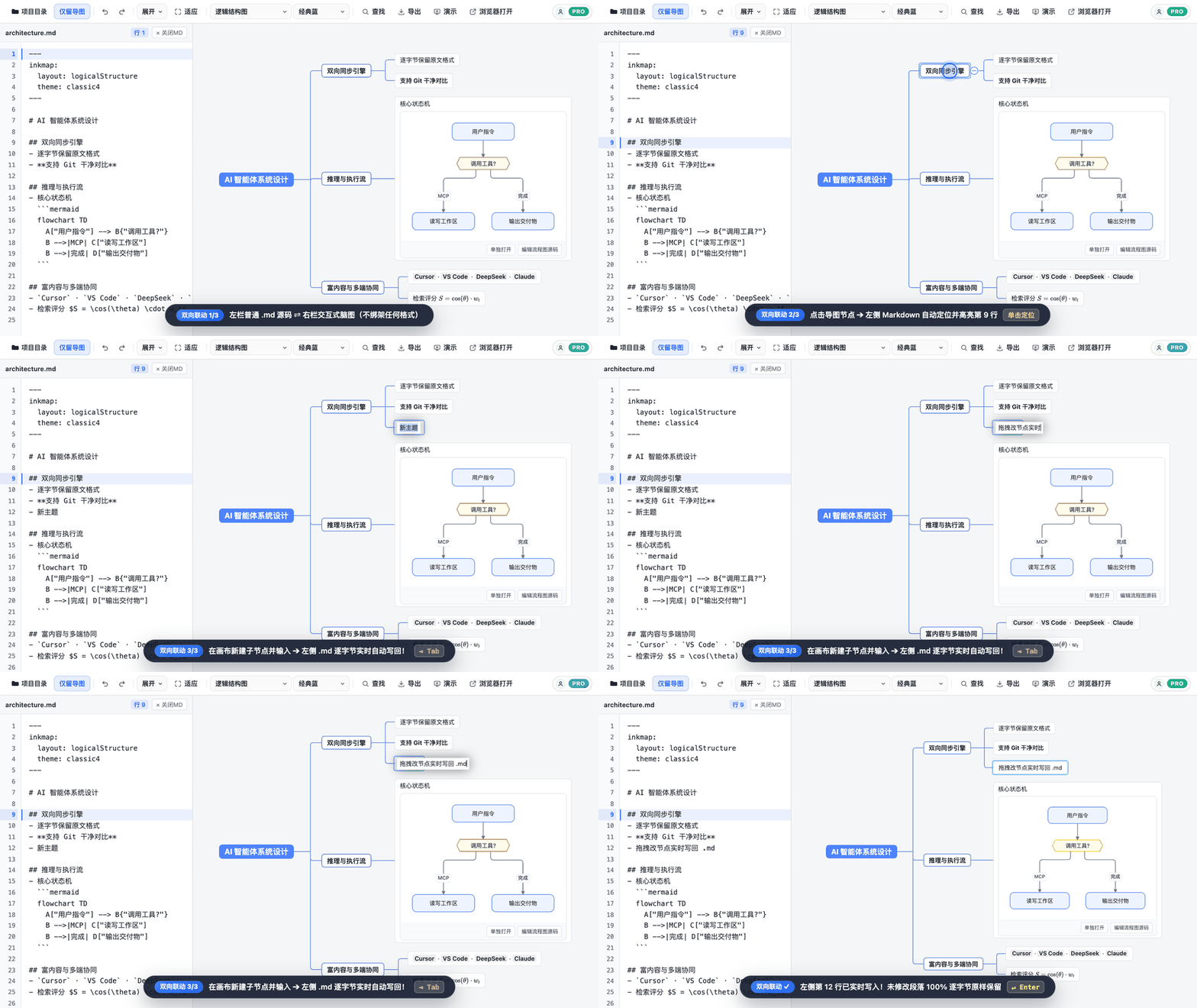
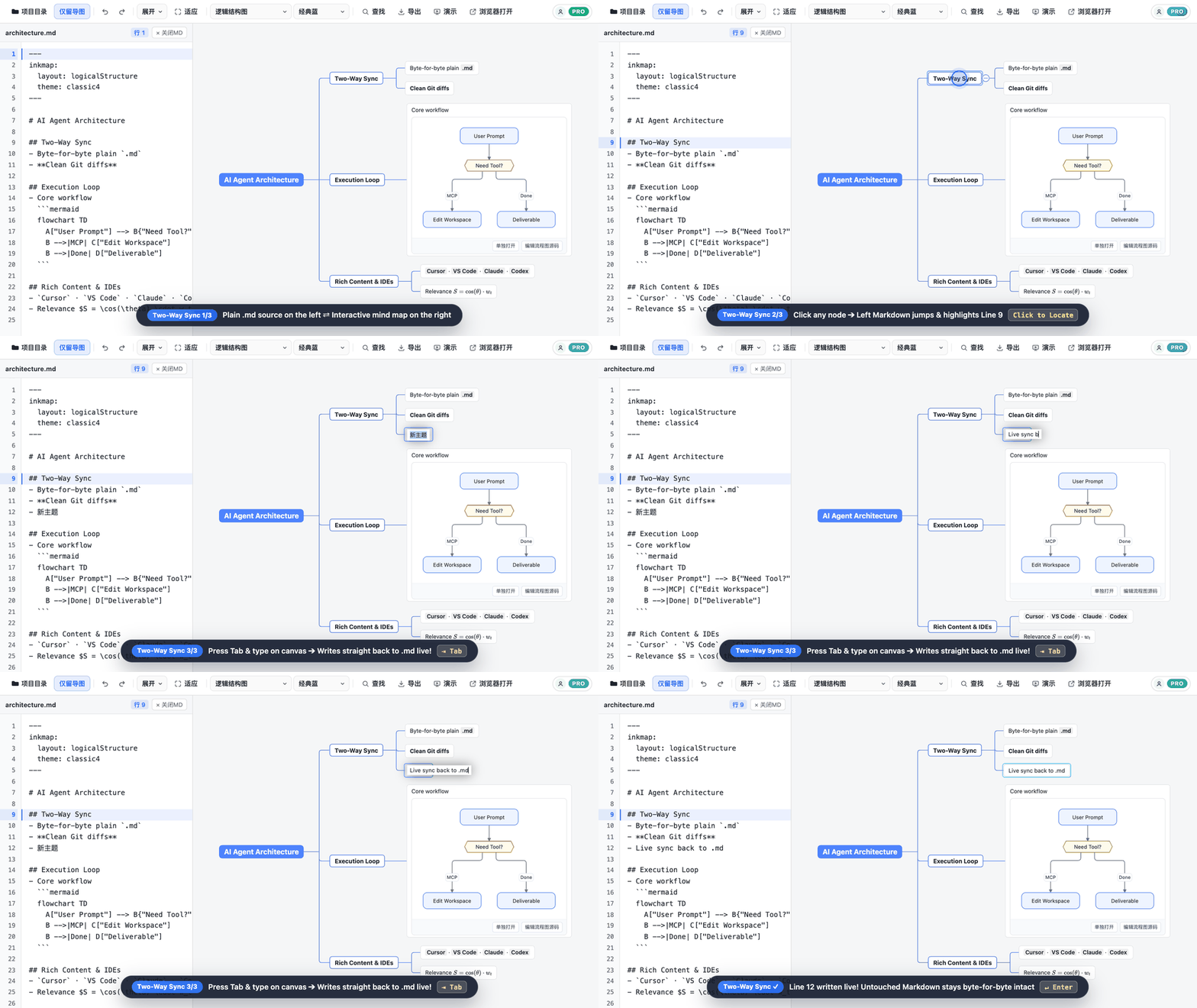
核心能力逐项对比:Inkmap vs Markmap vs XMind Feature Matrix: Inkmap vs. Markmap vs. XMind
| 对比维度Capability | Inkmap | Markmap | XMind / MindNode |
|---|---|---|---|
| 底层存储格式Storage Format | ✓ 纯文本本地 .md / .markmap.md✓ Plain local .md / .markmap.md |
✓ 纯文本 .md✓ Plain .md |
✕ 私有二进制压缩包(Git 无法对比)✕ Proprietary binary archive (unreadable in Git) |
| 画布双向交互编辑Two-Way Canvas Editing | ✓ 拖拽改层级、Tab/Enter 增删节点、双击编辑并毫秒级写回源文件✓ Drag to reorder, Tab/Enter to add nodes, double-click edit with instant writeback | ✕ 仅单向只读预览(必须回源码手改)✕ One-way read-only preview | ✓ 支持画布编辑(但导出 md 会丢失往返结构)✓ Canvas editing (one-way Markdown export) |
| Git Diff 干净度Git Diff Cleanliness | ✓ 未改动段落、Frontmatter、注释 100% 逐字节原样保留✓ Byte-preserving surgical edits; untouched lines never reformatted | 只读不改文件Read-only | ✕ 二进制冲突无法合并✕ Binary merge conflicts |
| 剪贴板截图一键贴图Clipboard Screenshot Paste | ✓ 按 ⌘V / Ctrl+V 自动存至 <文档>.assets/ 并写相对路径✓ Press Cmd+V / Ctrl+V to save locally to <doc>.assets/ |
✕ 需手写图床链接或装第三方贴图插件✕ Manual image URLs required | ✕ 封死在私有包内,Markdown 无法直接引用✕ Locked inside binary file |
| Mermaid 流程图可视化编辑Visual Mermaid Editing | ✓ 直接在节点内点击流程图框与连线修改文案和拓扑✓ Click flowchart nodes & edges visually to edit Mermaid syntax | ✕ 仅静态展示或需手改语法✕ Static render only | ✕ 不支持 Mermaid 代码同步✕ No Mermaid code sync |
| 多视图布局与 AI 客户端原生支持Layouts & AI Agent MCP Support | ✓ 9 种布局(树图/组织图/鱼骨图/时间轴)+ 桌面端 / VS Code / Cursor / Claude / Codex✓ 9 layouts (Tree, Org, Fishbone, Timeline) + Desktop, VS Code, Cursor, Claude & Codex MCP | 单一向右树形布局为主Single right-tree layout | 独立软件,无法嵌入代码编辑器与 AI 会话Standalone app only; no IDE or MCP integration |
30 秒无感迁移:直接打开现有的 Markmap 文档 Zero-Friction Migration: Open Your Existing Markdown Files Today
无需任何格式导入导出——在 VS Code / Cursor 扩展商店搜索 Inkmap,或直接用一行命令为 Claude Desktop、Claude Code、Codex 与本机浏览器配置好工作台:
No import or conversion step needed. Search Inkmap in VS Code / Cursor Extensions, download the native Desktop App, or run one command for Claude, Codex, and the local browser workbench:
# Auto-configure Claude Desktop, Claude Code, Cursor, VS Code & Codex:
npx -y inkmap-mcp@latest install

# Or open any .md / .markmap.md file immediately in the 3-column browser workbench:
npx -y inkmap-mcp@latest roadmap.md常见问题(FAQ)Frequently Asked Questions
1. 原有的 `.markmap.md` 文件可以直接在 Inkmap 打开吗?1. Can Inkmap open my existing `.markmap.md` files directly?
完全可以。Inkmap 原生支持 `.md` 与 `.markmap.md` 后缀,保留 YAML Frontmatter、代码块、表格和 KaTeX 数学公式,改完后依然是标准 Markdown,随时也能再用 Markmap 或 Obsidian 打开。Yes. Inkmap natively reads and writes both `.md` and `.markmap.md` files while preserving YAML frontmatter, GFM tables, code blocks, and KaTeX formulas—so your files remain 100% compatible with Obsidian, GitHub, and Markmap.
2. 在画布上改一个节点,会把整篇 Markdown 重新格式化弄乱 Git 记录吗?2. Will editing one node reformat my entire Markdown file and pollute `git diff`?
不会。Inkmap 采用精准范围定位写回引擎(Byte-Preserving Sync),只修改被改动节点对应的行,其余未触碰段落连空格和换行都原封不动。Never. Inkmap uses surgical byte-range replacement so only the exact heading or list item you touched changes—leaving every other line, blank line, and comment untouched.